


Quick Summary
- Cloud-based eLearning software is a web-hosted training platform that enables scalable learning delivery without on-premise infrastructure.
- As of 2025, enterprises are moving to cloud-native learning ecosystems to support remote workforces, compliance needs, and global scalability.
- The right platform should be evaluated based on security, integrations, deployment model, scalability, analytics, and cost structure.
Are you exploring cloud-based eLearning solutions and trying to understand whether they’re the right fit for your organisation?
If so, you’re not alone.
In 2025, more than half of enterprise learning teams are actively transitioning from traditional LMS systems and on-prem learning environments to flexible, cloud-native digital learning infrastructure.
And there’s a good reason for that.
Legacy systems weren’t built for global teams, hybrid work, continuous reskilling, or rapidly changing compliance requirements. They’re often slow, expensive to maintain, and difficult to integrate with modern digital learning workflows.
Cloud-based eLearning platforms address these challenges by providing secure, scalable, and browser-based access along with automatic updates, which simplify deployment, management, and adaptation as your organisation expands.
But here’s the thing:
Before investing, it’s important to understand what cloud-based eLearning software actually is, how it compares to legacy systems, and what features matter most when evaluating a platform.
Let’s break it down.
In this article, you’ll learn:
- What cloud-based eLearning software is (simple + enterprise definition)
- Key features of modern cloud platforms include
- Cloud vs. On-Premise vs Hybrid deployment models
- Security, compliance, scalability & cost considerations
- Common enterprise use cases across India + USA
- How to evaluate cloud learning platforms in 2025
- And finally, access a downloadable evaluation checklist
What Is Cloud-Based eLearning Software?
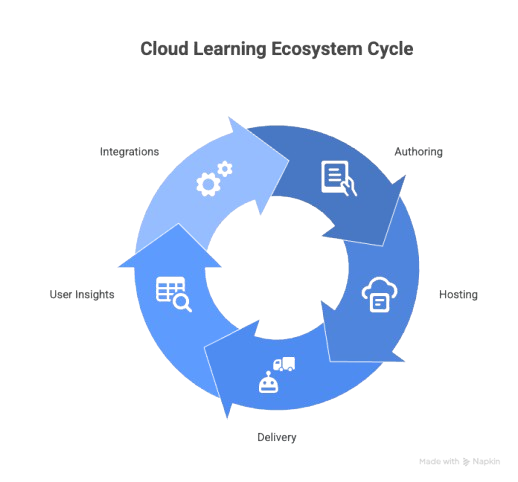
Cloud-based eLearning software is a modern, web-hosted learning platform that allows organisations to build, deliver, manage, and track training without installing or maintaining software on internal servers. All processes, including content creation, learner access, and analytics, are conducted online.
As organisations expand globally and hybrid work became the norm in 2025, cloud-based learning enables scalable, secure, mobile-first training delivery across locations, devices, and time zones.
Instead of learning being tied to physical infrastructure or outdated desktop tools, it now lives in a flexible, cloud-native ecosystem built to adapt and evolve.
Simple Definition
Cloud-based eLearning software is a browser-based training platform where learning content, user management, reporting, and collaboration take place online, with no installations necessary.
Learners can access it through a browser or mobile app, while admins can update content, assign courses, or track performance from anywhere.
How It Differs from Desktop or Legacy eLearning Tools
Let’s break it down simply:
Legacy learning tools were built for a world where training was static.
Cloud learning is built for a world where learning is continuous.
| Feature | Legacy/Desktop Tools | Cloud-Based eLearning |
| Installation | Requires local install or servers | No installation needed |
| Updates | Manual, IT-driven | Automatic + continuous |
| Accessibility | Device/network dependent | Any device, anytime |
| Collaboration | Limited | Real-time, distributed |
| Maintenance | High cost + effort | Vendor-managed |
As learning continues to move beyond desktop-restricted environments and region-dependent delivery systems, the original vision of web-based education becomes increasingly relevant in 2025. Even before cloud technology became mainstream, early instructional design pioneers imagined a future where learning would be flexible, borderless, and accessible anytime.
“Web-based instruction provides learners with flexibility to access learning resources from anywhere and at any time.”
– Badrul H. Khan, Author of Web-Based Instruction (1997)
Today, that vision is finally playing out at enterprise scale. Industry data reflects the shift clearly: Gartner reports that by late 2025, more than 75% of enterprise learning platforms will operate fully or partially in the cloud. This acceleration reinforces that cloud-based delivery isn’t just a technology preference; it’s now the expected foundation for scalable learning ecosystems.
Deciding between keeping your servers in-house (On-Premise) or moving to a hosted platform (Cloud) involves key trade-offs in maintenance, cost, and control. If you are struggling to visualize the difference in infrastructure responsibilities, this short video breaks down the pros and cons of each model
Why Enterprises Are Moving Toward Cloud-Native Learning Ecosystems
Enterprises in India, the USA, and globally are shifting because cloud-first learning ecosystems offer:
- Faster deployment and easier scaling
- Automatic platform upgrades, no downtime
- Integration with HRIS, CRM, LMS, and SSO systems
- Advanced reporting and skill insights
- Improved learner experience (mobile-first, frictionless)
- Lower total cost of ownership vs. on-premise models
So what does this mean for you?
It means your learning platform can finally be agile, future-proof, and the pace of organisational change is often challenging for traditional systems to keep up with.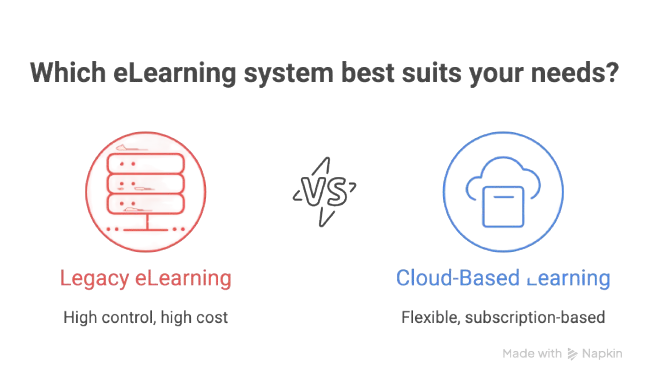
Key Features of Cloud-Based eLearning Platforms
Not all cloud learning platforms offer the same capabilities, but most mature, enterprise-ready systems share a core feature set designed to support large-scale delivery, rapid content updates, and seamless user experience.
If you’re comparing vendors in 2026, use the features below as your baseline evaluation criteria.
Cloud Authoring & Course Creation
One of the biggest advantages of cloud-based platforms is the ability to create and update content collaboratively without desktop-based tools or software installation.
Common capabilities include:
- Drag-and-drop course builders
- SCORM, xAPI, and cmi5 interoperability
- Video-based learning support
- Microlearning and modular content reuse
- AI-powered content suggestions (depending on platform)
Why does this matter?
Because training content changes, policies evolve, roles shift, and skills need constant updating. Cloud authoring ensures updates happen in minutes, not months.
Real-Time Collaboration for L&D Teams
Global learning teams, SMEs, reviewers, and compliance stakeholders can collaborate in real-time, whether they’re in Bengaluru or California.
Built-in workflow features may include:
- Commenting and inline feedback
- Version control and publishing history
- Task assignments and approval workflows
- Side-by-side comparisons of revisions
Cloud-based platforms aren’t just improving access; they’re reshaping how learning is delivered and experienced. As workplaces evolve and digital ecosystems mature, learners expect content that aligns with their role, pace, competencies, and growth path. This shift has made personalisation one of the most defining characteristics of modern cloud-native learning.
“The biggest growth in e-Learning will be in personalisation.”
– Elliott Masie, Learning Technology Analyst & eLearning Pioneer
That prediction has now moved from theory to measurable reality. Recent data reflects this transformation: a Deloitte workplace study found that teams using cloud-native collaboration and personalisation workflows reduced content production time by 30–45%. Personalisation isn’t just improving learner experience, it’s improving operational efficiency and accelerating time-to-value for learning teams.
Hosting, Storage & Global Content Delivery
With the platform hosted in the cloud, IT no longer needs to manage servers, patches, or storage expansions.
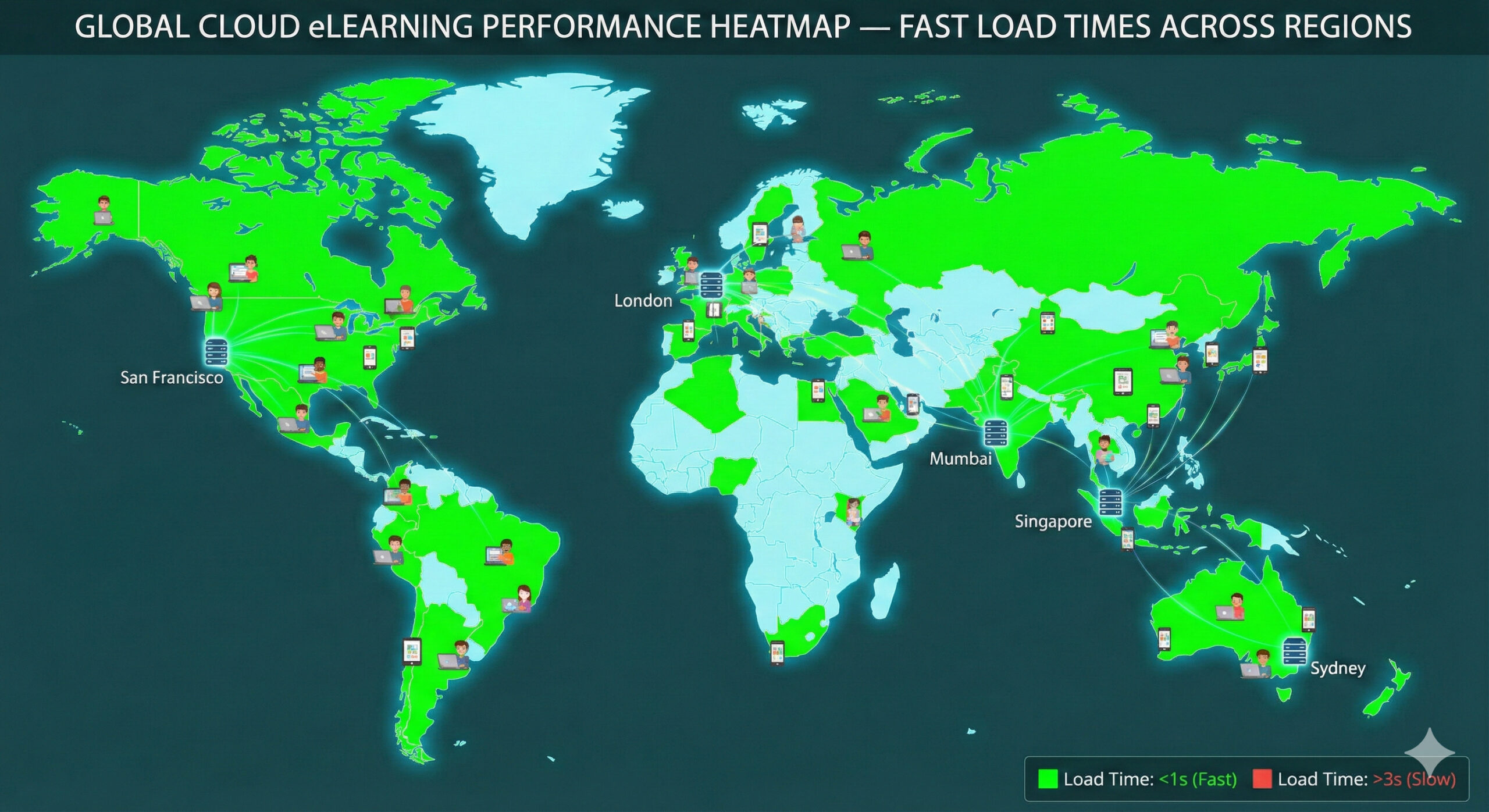
Most platforms leverage a CDN (Content Delivery Network) to ensure fast course loading globally, whether learners are accessing high-resolution videos or simulations.

Advanced Analytics & Learning Insights
Modern cloud systems provide more than basic reports like completions; they include dashboards that reveal skill gaps, engagement trends, compliance risks, and the impact of learning.
Analytics may include:
- Cohort and role-based insights
- Predictive performance metrics
- Personalised learning recommendations
- LRS support for xAPI-based data models
So, what’s the outcome?
Data transforms into decision-making fuel, shifting L&D from a cost centre to a measurable strategic function.
Integrations (LMS, HRIS, SSO, Content Libraries, APIs)
Cloud-based platforms integrate with enterprise systems such as:
- HR systems (SAP SuccessFactors, Workday, Oracle)
- Virtual classroom tools (Zoom, MS Teams)
- Authentication systems (SAML, OAuth, Azure AD SSO)
- Content hubs (LinkedIn Learning, Coursera, Udemy Business)
These integrations allow learning to be seamlessly incorporated into existing workflows, eliminating the need for separate logins or isolated systems. Cloud-based learning solutions offer organisations the flexibility to quickly update training materials in real-time, ensuring that the content stays relevant and engaging for learners, regardless of their location or schedule.
Deployment Models Explained
Before choosing a cloud-based eLearning platform, it’s essential to understand the various deployment models available because not every organisation is prepared to transition fully to the cloud from the start.
Major cloud providers like Amazon Web Services (AWS) and Microsoft Azure have established robust infrastructures that enhance the reliability and effectiveness of cloud-based eLearning platforms.
Some companies are migrating from legacy infrastructure, while others operate in regulated environments requiring stricter data control. Choosing the right model ensures smoother rollout, better alignment with compliance needs, and long-term scalability.
Let’s break down the three most common deployment methods.
Cloud-Based eLearning (Fully SaaS)
A fully SaaS (Software-as-a-Service) model means everything, like content storage, hosting, updates, and analytics, lives in the cloud.
There’s no software installation, no server maintenance, and upgrades happen automatically.
Best for organisations that want:
- Fast implementation
- Lower IT involvement
- Automatic platform improvements
- Global learner access across devices
- Predictable operational costs
In simpler terms, if your workforce is distributed or scaling, SaaS reduces friction and speeds up the rollout process.
On-Premise Learning Systems
In an on-premise model, the platform runs inside the organisation’s own servers and private network.
This provides maximum control, but also the highest responsibility, including maintenance, updates, security patches, uptime, and backups.
Typically chosen by:
- Government or defence sectors
- Healthcare organisations with strict compliance
- Legacy environments with data classification policies
- Systems requiring air-gapped deployment
However, this model often results in longer implementation cycles, higher IT overhead, and delayed innovation.
Hybrid Deployments
A hybrid deployment combines on-premise data governance with cloud-based delivery or authoring.
Example scenarios:
- Learners access content via a cloud front end, while data remains internally hosted.
- Admin workflows and integrations run in the cloud, but security-sensitive records stay local.
This hybrid strategy serves as a bridge, making it well-suited for organisations that are undergoing modernisation in phases.
Comparison Table: Cloud vs On-Premise vs Hybrid
Criteria | Cloud-Based | On-Premise | Hybrid |
Cost Model | Operational (subscription) | Capital expenditure | Mixed |
Scalability | Automatic, unlimited | Hardware-limited | Conditional |
IT Involvement | Low | High | Medium |
Updates | Automatic | Manual | Partial |
Security Responsibility | Shared | Organization-owned | Shared |
Deployment Timeline | 2–6 weeks | 3–9 months | Variable |
Ideal Use Case | Scaling modern learning | Regulated & internal networks | Gradual migration |
Security & Compliance Considerations
When training platforms move to the cloud, the first question almost every IT, HR, or compliance team asks is:
“Is it secure?”
Yes, when implemented correctly, cloud-based eLearning platforms can be even more secure than traditional on-premise solutions.
In 2025, security frameworks for cloud learning are built on industry-grade encryption, access governance, regulatory compliance, and enterprise authentication standards. The responsibility model is shared between the platform provider and your organization, meaning security is built by design rather than added as an afterthought.
Let’s break down what that actually means.
Data Encryption & Compliance Standards
Most modern cloud learning platforms follow globally recognised compliance frameworks such as:
- GDPR (European data protection)
- ISO 27001 (information security)
- SOC 2 Type II (controls for security, availability, and confidentiality)
- FERPA/HIPAA support (where applicable for education & healthcare)
Additionally, data is typically encrypted:
- In transit (TLS/HTTPS)
- At rest (AES-256 or equivalent)
Role-Based Access Control (RBAC)
Instead of one-size-fits-all permissions, role-based access ensures each user type, learners, instructors, reviewers, and administrators, sees only the data and features relevant to their role.
This reduces risk, improves audits, and supports governance across distributed teams.
Secure Hosting, Backups & Uptime SLAs
Cloud-based platforms generally utilise enterprise cloud providers such as AWS, Azure, or Google Cloud, which come with built-in features.
- Disaster recovery environments
- Automated backups
- Multi-region redundancy
- Uptime guarantees (often 99.5%–99.9%)
So what does this mean for your organisation?
It means continuity even during traffic spikes, onboarding surges, or compliance audit cycles.
Scalability & Performance Benefits
One of the biggest reasons organisations are shifting to cloud-based eLearning in 2025 is scalability. As learning needs grow, whether it’s onboarding hundreds of new employees, rolling out compliance training globally, or enabling partner and customer education cloud platforms to scale automatically without requiring additional IT infrastructure.
So why does this matter?
Because traditional systems can struggle under load, especially when video-based courses, virtual classrooms, or large learner cohorts access the platform simultaneously. Cloud learning platforms use elastic infrastructure, meaning resources automatically expand or contract based on real-time usage.
This ensures:
- Fast content delivery, even during peak demand
- Smooth access across devices (desktop, tablet, mobile)
- Multi-region access with reduced latency
- Better support for video, simulation, and AI-driven learning experiences
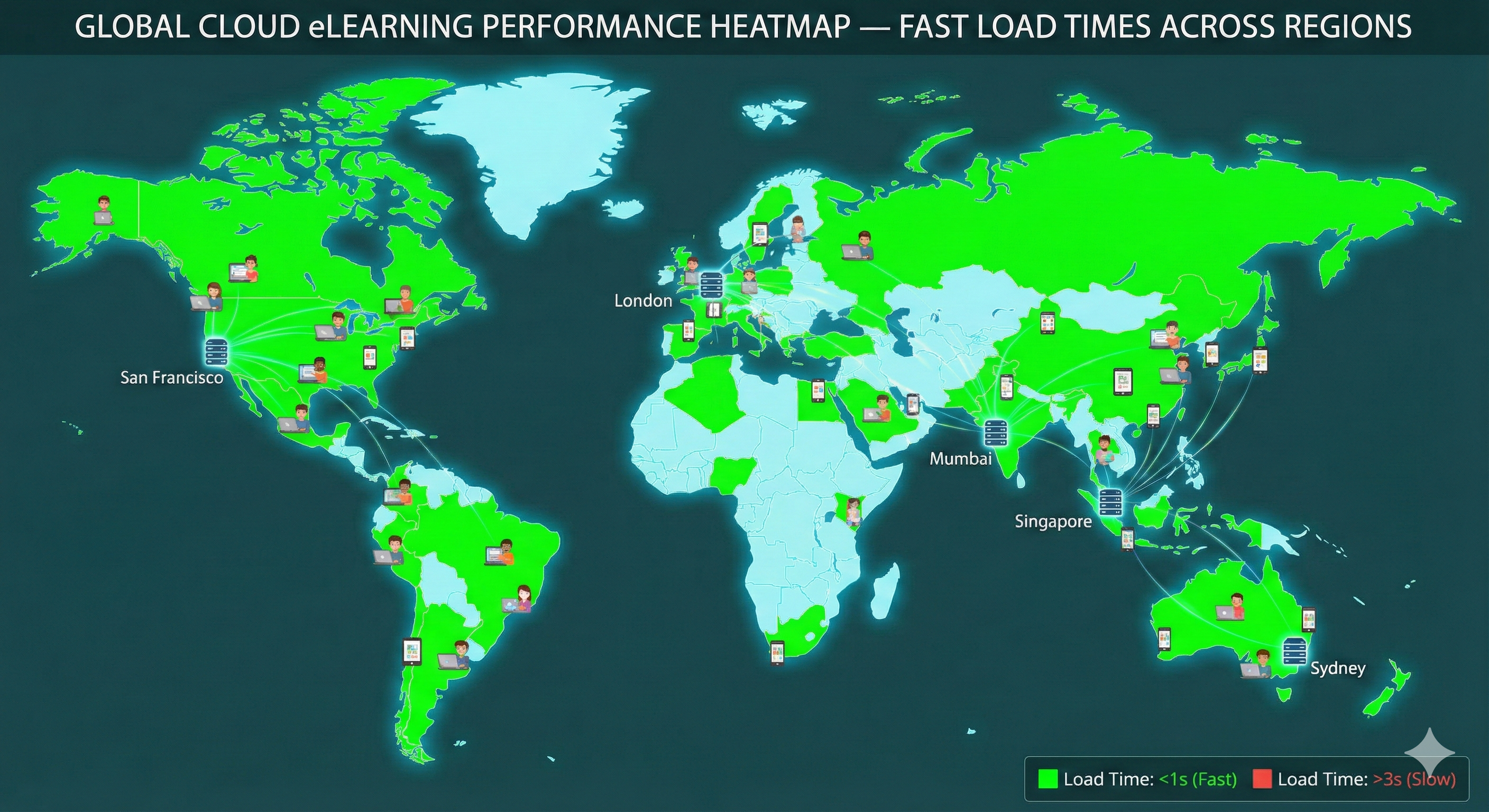
Many platforms also use CDNs (Content Delivery Networks) to deliver content closer to the learner’s location, whether they’re in Mumbai, San Francisco, or Singapore.
According to a McKinsey Digital Learning Report, organisations using cloud-native delivery experience 40–60% faster rollout capability for large-scale learning programs.
With cloud scalability, learning turns into an enabler rather than a bottleneck.

Common Enterprise Use Cases
Cloud-based eLearning isn’t limited to a single industry or training type, and that’s one of its biggest strengths. Because it’s flexible, scalable, and accessible globally, organisations across India, the USA, and other regions use it to support a wide variety of learning workflows.
Whether you’re training employees, partners, customers, or frontline teams, cloud learning provides a unified platform that can evolve with business goals, compliance needs, and skill demands.
Let’s explore the most common scenarios where cloud eLearning platforms have delivered real impact in 2025.
Employee Onboarding & Role-Based Learning Paths
Onboarding is no longer a one-size-fits-all process. With cloud-based eLearning, HR and L&D teams can assign automated learning paths based on job role, department, location, or skill level.
This ensures:
- Faster ramp time
- Consistent onboarding experience
- Automated compliance & progress tracking
Example:
A global IT company onboarding engineers in Bengaluru and sales teams in New York using one centralised system with personalised content.
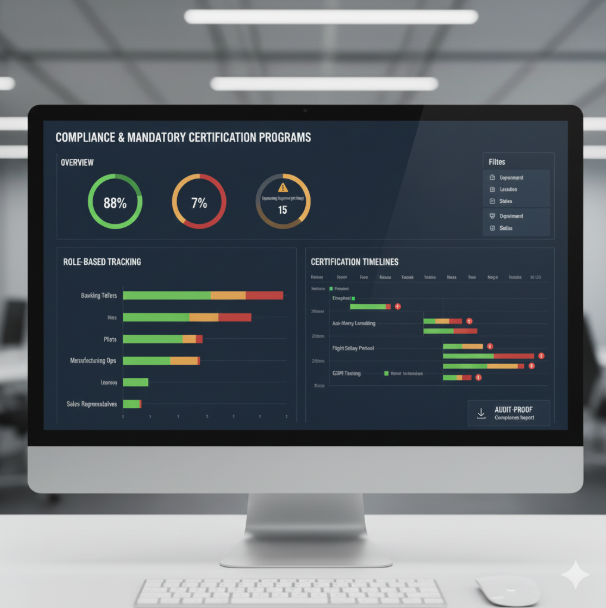
Compliance & Mandatory Certification Programs
Industries like banking, insurance, aviation, pharmaceuticals, and manufacturing require frequent regulatory training.
Cloud platforms help by offering:
- Auto-reminders for expiring certifications
- Audit-proof reporting dashboards
Role-based compliance tracking
Product Training for Customers & Partners
Organisations increasingly use cloud learning platforms as external education hubs, especially in SaaS, manufacturing, automotive, and healthcare.
This reduces support requests, accelerates adoption, and improves product experience.
Sales Enablement & Microlearning for Field Teams
Sales teams need up-to-date pricing, product knowledge, competitive intelligence, and pitch resources. Cloud platforms make this possible through:
- Bite-sized modules
- Video explainers
- Mobile-first access
- Offline mode for travel
- Push notifications for updates
Frontline Workforce Training
From hospital staff to retail store associates to logistics teams, frontline workers rarely sit at desks.
Cloud learning supports:
- Mobile-first delivery
- QR-based course access
- Regional language content
A 2025 LinkedIn Workplace Survey shows that mobile learning adoption improved training completion rates by 2–3x in frontline roles.
Cloud vs On-Premise vs Hybrid: Full Comparison
When evaluating learning platforms in 2025, one of the most strategic decisions you’ll make is choosing the right deployment model. While cloud-based eLearning now leads in adoption, many organisations still operate hybrid or fully on-premise environments, especially those with compliance-heavy or legacy infrastructure.
The right model depends on factors like security requirements, rollout speed, IT capacity, scalability needs, and long-term modernisation roadmap.
Let’s compare them clearly.
Comparison Table
Criteria | Cloud-Based | On-Premise | Hybrid |
Cost Model | Subscription (OpEx) | Hardware + Licensing (CapEx) | Mixed |
Deployment Speed | Fast (2–6 weeks) | Slow (3–9 months) | Variable |
Maintenance | Vendor-handled | Internal IT required | Shared |
Scalability | Elastic & automatic | Limited by hardware | Conditional |
Updates & Innovation | Automatic & frequent | Manual & infrequent | Partial |
Security Responsibility | Shared model | Fully internal | Shared |
Accessibility | Global, multi-device | Network restricted | Flexible |
Best For | Growing, distributed teams | Highly regulated & closed environments | Organizations transitioning away from legacy |
Guidance Based on Use Case
- Choose Cloud-Based if your priority is scaling digital learning globally, reducing maintenance costs, accelerating updates, and supporting hybrid or remote teams.
- Choose On-Premise if your organisation requires total data sovereignty, operates in strictly controlled environments, or lacks cloud readiness.
- Choose Hybrid if you’re migrating gradually and need to balance legacy systems with modern cloud-based authoring, delivery, or analytics.
Here’s the bottom line:
If your organisation plans to modernise learning beyond 2025, a cloud-first or hybrid approach provides better flexibility, agility, and long-term value than a traditional on-prem setup.
Gartner Insight: “By 2026, over 80% of enterprise learning systems will operate fully or partially on cloud infrastructure.”
Cost Considerations & Implementation Timelines
Cost is often one of the first factors to evaluate when comparing eLearning platforms, but pricing alone does not provide the complete picture. The real value lies in understanding the total cost of ownership and how different deployment models impact long-term IT investment, maintenance effort, and scalability.
In 2025, most cloud-based eLearning platforms follow a subscription-based pricing model (OpEx) that includes hosting, security updates, support, and maintenance. This removes the need for expensive infrastructure, hardware expansion, or dedicated server management.
By contrast, on-premise systems often involve CapEx-heavy costs, including:
- Server provisioning and storage
- Security audits and maintenance
- Hardware and network scaling
- Custom development and integration patches
- Ongoing IT staffing
So what does this mean for budgeting?
It means cloud models provide predictable costs, while on-premise environments require continual investment as the learning ecosystem expands.
Typical Cloud Rollout Timeline (2–6 Weeks)
A standard cloud platform implementation may include:
- Platform setup and branding
- SSO and HRIS/LMS integrations
- Course migration or authoring
- Pilot deployment
- Scaling to a full organisation
Organisations adopting cloud eLearning report rollout timelines that are up to 70% faster than those of legacy or on-premises deployments.
Hidden Costs in On-Prem Deployments
Common overlooked expenses include:
- Downtime risk and server redundancy
- Vendor dependency for patching custom builds
- Plugin license renewals
- Hardware scaling for peak usage
Cloud systems eliminate most of these, resulting in lower long-term ownership and simpler scaling.
How to Evaluate a Cloud-Based eLearning Platform
With so many learning platforms available today, choosing the right one can feel overwhelming, especially if your organisation is transitioning from a legacy LMS or scaling to multiple regions. The good news? With the right evaluation criteria, the decision becomes much clearer.
So, what should you look for?
Use the checklist below as a decision filter when comparing vendors in 2026:
Scalability: Can the platform support growth across locations, teams, and business units without redevelopment or server expansion?
Integrations: Does it connect with HRIS, CRM systems, SSO, virtual classrooms, and content libraries?
Security & Compliance: Does it meet standards like GDPR, ISO 27001, SOC 2, and role-based access requirements?
Analytics Capabilities: Can it measure learning outcomes, performance, and engagement, not just completion rates?
User Experience: Is it intuitive enough for learners, admins, and content creators?
Localisation & Accessibility: Does it support multilingual content and accessibility standards like WCAG?
Once a platform passes these criteria, it’s time to validate the cost model, migration path, and rollout timeline, which you’ll finalise using the downloadable evaluation checklist in the next section.
Download the Cloud eLearning Platform Evaluation Checklist
Evaluating eLearning platforms shouldn’t feel like guesswork, and choosing the wrong one can create long-term challenges in scalability, integrations, compliance, and user adoption. That’s exactly why we created the Cloud eLearning Platform Evaluation Checklist for 2025.
This guided framework will help you compare platforms based on:
- Deployment readiness
- Integration priorities
- Security and compliance requirements
- Analytics and reporting depth
- Cost and rollout feasibility
- Scalability and future expansion
Whether you’re modernising an existing LMS or building a cloud-native learning ecosystem from scratch, this checklist will help you make a confident, strategic decision.
Download the checklist, and if you’d like support, our experts can walk you through your current learning ecosystem and next steps.
Frequently Asked Questions
1. What is cloud-based eLearning software?
Cloud-based eLearning software is a web-hosted training platform that allows organisations to create, deliver, and track learning online without installing software on local servers. Learning content, progress records, assessments, analytics, and collaboration all happen through the cloud, enabling fast access across devices and locations.
Example use cases: remote onboarding, compliance training, and partner enablement.
2. Is cloud-based eLearning secure for enterprise use?
Yes, when built with modern compliance frameworks. Most platforms support standards such as GDPR, ISO 27001, SOC 2 Type II, and enterprise authentication (SSO, MFA, RBAC).
Security responsibility is shared:
- The platform provider manages infrastructure security.
- Your organisation manages user access and governance.
3. How is cloud-based learning different from traditional on-premise LMS systems?
The biggest differences are maintenance, scalability, and flexibility.
Factor | Cloud-Based | On-Premise |
Deployment Time | Weeks | Months |
Updates | Automatic | Manual |
IT Dependency | Low | High |
Scalability | Automatic | Hardware limited |
Cost Model | Subscription | CapEx + maintenance |
Cloud is ideal for organisations scaling across regions or modernising learning infrastructure beyond 2025.
4. How long does implementation typically take?
Most cloud platforms can be configured and deployed within 2–6 weeks, depending on:
- Integrations (HRIS, CRM, SSO)
- Content migration volume
- Number of learner roles and workflows
- Rollout mode (pilot vs enterprise launch)
Enterprises adopting cloud-based learning report deployment cycles up to 70% faster than legacy LMS replacements.
5. Who should consider adopting cloud-based eLearning?
Cloud learning is ideal for:
- Enterprises scaling workforce or compliance training
- Learning teams transitioning from legacy systems
- Organisations, training partners, or customers
- Companies supporting hybrid, remote, or global teams
- EdTech products requiring multi-tenant architecture
If your strategy includes automation, personalisation, AI-driven learning, and integrations, a cloud-native platform is typically the best path forward.
Key Takeaways
Cloud-based eLearning software has become the foundation of modern learning ecosystems, especially as enterprises scale digital training across global teams, accelerate onboarding, and shift from legacy LMS environments. In 2025, organisations are prioritising platforms that are secure, scalable, integration-ready, and built to support continuous learning rather than one-time training.
To recap:
- Cloud-based platforms deliver training online without on-premise setup or maintenance.
- They offer faster deployment, automatic updates, better scalability, and seamless integrations.
- Use cases span compliance, onboarding, customer training, partner enablement, and frontline workforce learning.
- Choosing the right platform means evaluating technology, security, UX, analytics, and long-term scalability, not just cost.
If you’re planning a transition to cloud-based learning, use the downloadable evaluation checklist and (if needed) request a consultation to map your migration strategy with confidence.
Author Bio
Gourab Majumder
– Founder & CEO, Renoweb Digital Solutions
Gourab Majumder is the Founder & CEO of Renoweb Digital Solutions, a B2B consultant, business mentor, blogger, and organic marketing expert who writes about SaaS growth, content strategy, CX, and EdTech-driven innovation for modern digital businesses.